A9 Header Bidding: Complete Implementation Guide for Publishers in 2024
Learn how Amazon A9 header bidding works, implementation best practices, troubleshooting tips, and optimization strategies for maximum revenue.
What is A9 Header Bidding?
A9 header bidding, developed by Amazon's advertising technology division, represents one of the most significant revenue opportunities for publishers in today's programmatic advertising landscape. As Amazon's demand-side platform (DSP) continues to grow, A9 has become a critical component in publisher monetization strategies, offering access to Amazon's vast advertiser ecosystem and premium demand sources.
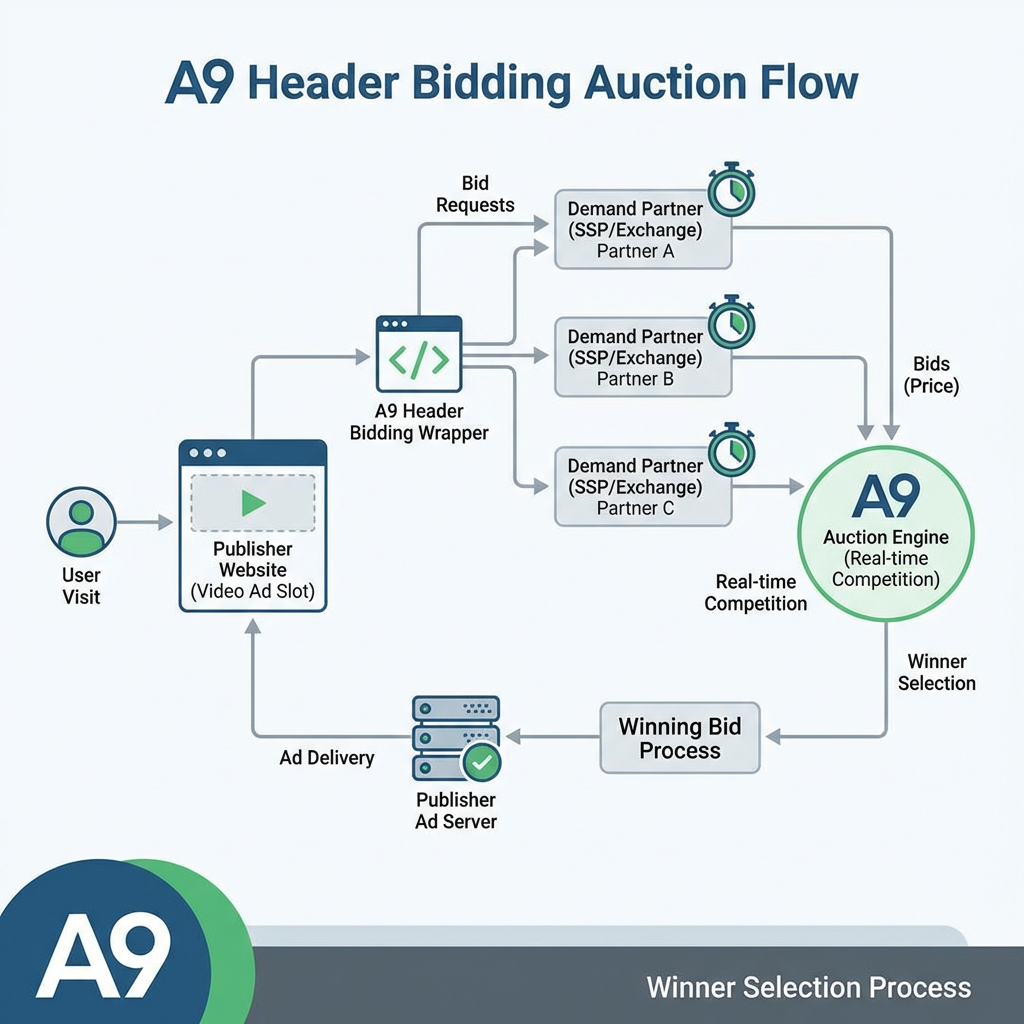
Unlike traditional waterfall setups where ad requests are processed sequentially, A9 header bidding enables publishers to receive real-time bids from Amazon's demand sources simultaneously with other header bidding partners. This creates a more competitive auction environment, typically resulting in higher CPMs and increased overall ad revenue.
The A9 solution integrates seamlessly with existing header bidding setups, supporting both display and video advertising formats. For publishers running video content, this means A9 can compete for video ad inventory alongside other demand partners, creating additional monetization opportunities across all content types.
How A9 Header Bidding Works
The Technical Process
A9 header bidding operates through a client-side JavaScript library that executes before your primary ad server calls. Here's the step-by-step process:
- Page Load Initialization: When a user visits your page, the A9 header bidding code initializes alongside other header bidding partners
- Bid Request: A9 sends bid requests to Amazon's demand sources, including information about the available ad slots, user context, and targeting parameters
- Real-Time Auction: Amazon's systems evaluate the bid request against available demand and return competitive bids
- Price Competition: A9 bids compete against other header bidding partners in a unified auction
- Winner Selection: The highest bid wins the impression and serves the ad
Key Differentiators
A9's integration with Amazon's broader ecosystem provides several unique advantages:
- First-Party Data: Access to Amazon's extensive first-party shopping and behavioral data
- Premium Demand: Direct access to Amazon's advertising clients, including major brands and Amazon sellers
- Cross-Device Targeting: Leveraging Amazon's login-based user identification across devices
- Dynamic Pricing: Real-time bid optimization based on user intent and purchase behavior
Implementation Guide
Prerequisites
Before implementing A9 header bidding, ensure you have:
- Active Amazon Publisher Services account
- Existing header bidding setup (Prebid.js recommended)
- Google Ad Manager (GAM) or compatible ad server
- Technical resources for implementation and testing
Step 1: Account Setup and Configuration
Contact Amazon Publisher Services to establish your A9 account. During this process, you'll need to provide:
- Website traffic statistics and demographics
- Current monetization setup details
- Available ad slot information and specifications
- Integration timeline and technical requirements
Amazon will review your application and provide account credentials along with specific configuration parameters for your implementation.
Step 2: Code Implementation
Implement the A9 header bidding code in your page header, before your existing header bidding setup:
<script>
  !function(a9,a,p,s,i,t,e){a9.cmd=a9.cmd||[];a9.cmd.push(function(){
    a9.init({
      pubId: 'YOUR_PUB_ID_HERE',
      adServer: 'googletag'
    });
  });
  // Additional configuration parameters
}(window.apstag = window.apstag || {}, window, document, 'script');
</script>
Step 3: Ad Slot Configuration
Define your ad slots within the A9 configuration, specifying dimensions, placement types, and targeting parameters:
a9.cmd.push(function() {
  a9.fetchBids({
    slots: [{
      slotID: 'header-banner',
      slotName: '/your-network/header-banner',
      sizes: [[728, 90], [970, 250]]
    }, {
      slotID: 'video-player',
      slotName: '/your-network/video-player',
      mediaType: 'video'
    }],
    timeout: 1000
  }, function(bids) {
    // Process returned bids
    googletag.cmd.push(function() {
      a9.setDisplayBids();
      googletag.pubads().refresh();
    });
  });
});
Step 4: Integration with Prebid.js
For publishers using Prebid.js, A9 can be integrated as an additional demand partner:
var adUnits = [{
  code: 'header-banner',
  mediaTypes: {
    banner: {
      sizes: [[728, 90], [970, 250]]
    }
  },
  bids: [{
    bidder: 'amazon',
    params: {
      slotID: 'header-banner'
    }
  }]
}];
Optimization Strategies
Timeout Management
Optimal timeout settings balance revenue potential with page performance. Industry best practices suggest:
- Desktop: 1000-1500ms timeout
- Mobile: 800-1200ms timeout
- Video: 1500-2000ms timeout for complex video setups
Monitor your analytics to find the sweet spot between bid response rates and page load times.
Floor Price Optimization
A9 supports dynamic floor pricing, allowing you to set minimum bid thresholds:
slots: [{
  slotID: 'premium-banner',
  slotName: '/network/premium-banner',
  sizes: [[728, 90]],
  floor: 2.50 // Minimum CPM floor
}]
Regularly analyze performance data to adjust floor prices based on:
- Historical performance by ad unit
- Seasonal demand fluctuations
- Competitive landscape changes
- User segment performance
Video Integration Optimization
For publishers monetizing video content, A9 integration requires specific considerations. Whether using Veedmo or other video player solutions, ensure your setup supports header bidding for video inventory. Key optimization areas include:
- Pre-roll Positioning: Optimize A9 competition for high-value pre-roll inventory
- Video Context Targeting: Leverage video content metadata for better targeting
- Player Integration: Ensure seamless integration with your video player's ad serving logic
Troubleshooting Common Issues
Bid Response Problems
Issue: Low bid response rates or no bids from A9
Solutions:
- Verify account configuration and credentials
- Check ad slot specifications match A9 requirements
- Review targeting parameters for overly restrictive settings
- Confirm timeout settings allow sufficient response time
Revenue Discrepancies
Issue: Expected revenue increases not materializing
Solutions:
- Audit floor price settings for optimal competition
- Review ad server line item priorities and configurations
- Analyze bid landscape and competitive positioning
- Optimize timeout settings for better fill rates
Technical Integration Issues
Issue: JavaScript errors or implementation conflicts
Solutions:
- Verify proper script loading order
- Check for conflicts with other header bidding partners
- Review console logs for specific error messages
- Implement proper error handling and fallback mechanisms
Performance Monitoring and Analytics
Key Metrics to Track
Establish comprehensive monitoring for A9 performance:
Revenue Metrics:
- CPM trends and comparisons
- Fill rate percentages
- Revenue per session/user
- Win rate against other demand partners
Technical Metrics:
- Bid response times
- Error rates and timeout occurrences
- Page load impact measurements
- Mobile vs. desktop performance variations
Reporting and Analysis
Utilize Amazon's reporting tools alongside your existing analytics:
- Amazon Publisher Services Dashboard: Monitor bid requests, fill rates, and revenue
- Google Analytics Integration: Track user engagement and session value
- Custom Reporting: Build automated reports combining A9 data with other revenue sources
Advanced Implementation Techniques
Dynamic Ad Slot Creation
For sites with dynamic content, implement flexible slot creation:
function createA9Slot(slotConfig) {
  a9.cmd.push(function() {
    a9.fetchBids({
      slots: [{
        slotID: slotConfig.id,
        slotName: slotConfig.name,
        sizes: slotConfig.sizes,
        targeting: slotConfig.targeting
      }],
      timeout: getOptimalTimeout(slotConfig.type)
    }, function(bids) {
      processA9Bids(bids, slotConfig);
    });
  });
}
Server-Side Integration
For high-traffic publishers, consider server-side A9 integration:
- Reduced client-side JavaScript overhead
- Improved page performance
- Enhanced targeting capabilities
- Better mobile optimization
Multi-Format Optimization
Optimize A9 across different ad formats:
Display Advertising:
- Test various creative sizes and formats
- Implement responsive ad units for mobile optimization
- Optimize placement positioning for viewability
Video Advertising:
- Configure proper VAST/VPAID support
- Implement video completion tracking
- Optimize for different video content types
Best Practices and Recommendations
Implementation Best Practices
- Gradual Rollout: Implement A9 on a subset of traffic initially to measure impact
- A/B Testing: Run controlled tests comparing performance with and without A9
- Regular Optimization: Continuously monitor and adjust settings based on performance data
- Technical Monitoring: Implement comprehensive error tracking and performance monitoring
Revenue Optimization
- Competitive Analysis: Regular review of win rates against other demand partners
- Seasonal Adjustments: Modify settings for seasonal demand patterns
- User Segmentation: Optimize different user segments with tailored configurations
- Cross-Format Strategy: Leverage A9 across all available ad formats for maximum revenue
Future Considerations
As the header bidding landscape continues evolving, consider these emerging trends:
- Privacy Regulations: Ensure A9 implementation complies with GDPR, CCPA, and other privacy laws
- Mobile Optimization: Focus on mobile-first implementations as mobile traffic continues growing
- Video Growth: Prepare for increased video advertising demand and optimization opportunities
- First-Party Data: Leverage your own first-party data in combination with A9's targeting capabilities
Conclusion
A9 header bidding represents a significant opportunity for publishers to increase ad revenue through access to Amazon's premium demand and sophisticated targeting capabilities. Successful implementation requires careful planning, technical expertise, and ongoing optimization.
By following the implementation guidelines, optimization strategies, and best practices outlined in this guide, publishers can effectively integrate A9 into their monetization stack and realize meaningful revenue improvements. Remember that header bidding success requires continuous monitoring and optimization – treat A9 as an ongoing revenue optimization tool rather than a set-and-forget solution.
The key to maximizing A9 performance lies in understanding your specific audience, content, and technical constraints, then tailoring the implementation accordingly. With proper setup and ongoing optimization, A9 can become a valuable component of a diversified header bidding strategy that drives sustainable revenue growth.
Frequently asked questions
What are the minimum traffic requirements for A9 header bidding?
Amazon typically requires publishers to have substantial traffic volume, usually in the millions of monthly page views. Exact requirements vary by market and content type, so contact Amazon Publisher Services directly for specific qualification criteria.
How does A9 header bidding impact page load times?
A9 adds minimal latency when properly implemented with appropriate timeout settings. Most publishers see 50-200ms additional load time, which is offset by revenue gains. Use timeouts of 1000-1500ms for desktop and 800-1200ms for mobile.
Can A9 work alongside other header bidding partners?
Yes, A9 is designed to work with existing header bidding setups including Prebid.js and other demand partners. It participates in unified auctions alongside other bidders to ensure fair competition and optimal revenue.
What targeting capabilities does A9 header bidding offer?
A9 leverages Amazon's first-party shopping data, demographic information, and behavioral targeting. It supports contextual targeting, geographic targeting, device targeting, and can utilize Amazon's cross-device user identification.
How long does A9 implementation typically take?
Implementation timeline varies by complexity, but most publishers complete basic A9 setup within 2-4 weeks. This includes account approval, technical implementation, testing, and initial optimization. Complex setups may take longer.