Prebid.js: Complete Guide to Header Bidding Implementation for Publishers
Master Prebid.js implementation with our comprehensive guide. Learn setup, optimization, troubleshooting, and best practices for maximizing ad revenue.
Prebid.js: Complete Guide to Header Bidding Implementation for Publishers
Prebid.js has revolutionized programmatic advertising by democratizing header bidding technology. As an open-source wrapper, it enables publishers to conduct real-time auctions across multiple demand sources simultaneously, maximizing ad revenue and fill rates. This comprehensive guide covers everything publishers and ad ops professionals need to know about implementing and optimizing Prebid.js.
What is Prebid.js?
Prebid.js is an open-source JavaScript library that facilitates header bidding implementation on publisher websites. Developed and maintained by Prebid.org, it serves as a wrapper that manages multiple demand partners, conducts unified auctions, and integrates seamlessly with primary ad servers like Google Ad Manager.
Unlike proprietary header bidding solutions, Prebid.js offers complete transparency, customization flexibility, and vendor neutrality. Publishers can access its source code, modify functionality, and avoid vendor lock-in while benefiting from continuous community-driven improvements.
Key Components of Prebid.js
The Prebid.js ecosystem consists of several interconnected elements:
- Core Library: The foundational JavaScript code managing auction logic
- Adapters: Individual modules connecting to specific demand partners
- Analytics Adapters: Modules for tracking performance metrics
- User ID Modules: Components for identity resolution across browsers
- Real-Time Data Modules: Integrations for audience and contextual data
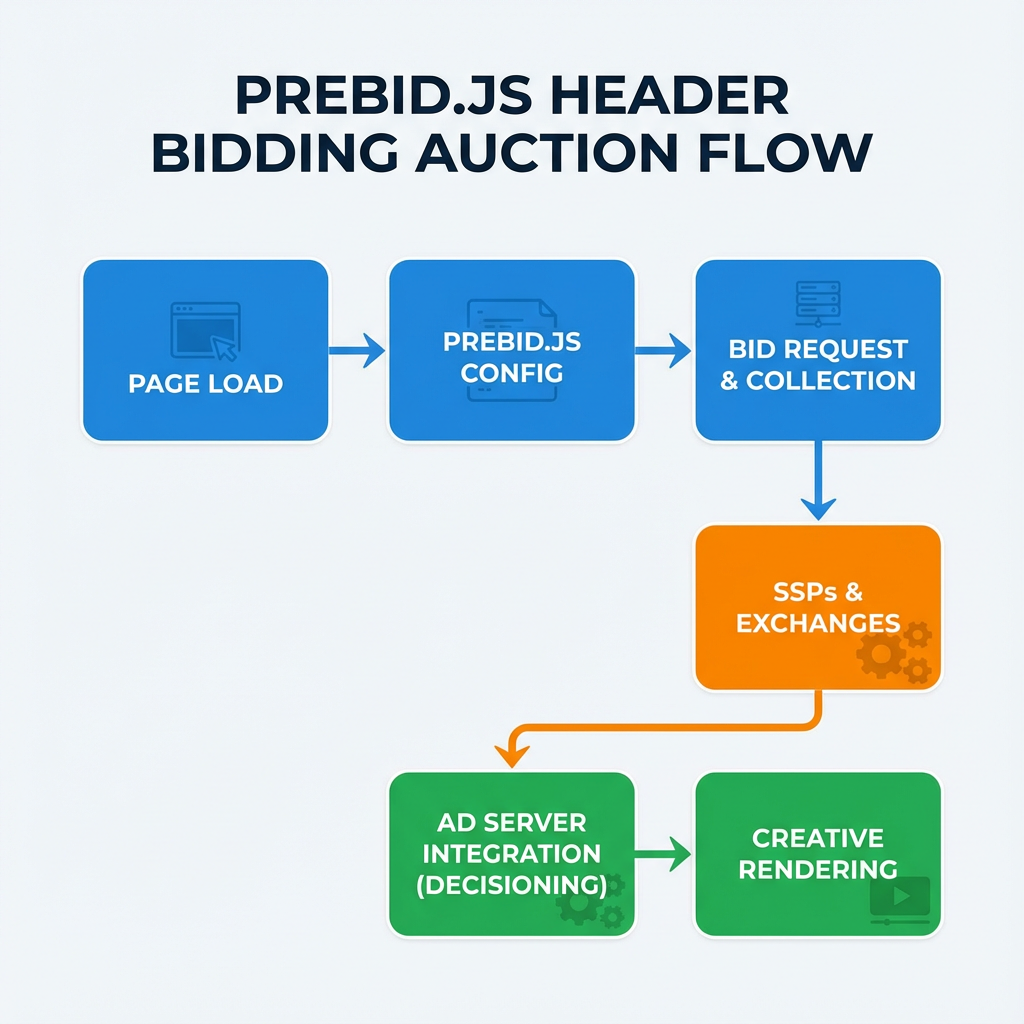
How Prebid.js Works: The Header Bidding Process
Understanding Prebid.js requires grasping the header bidding workflow it orchestrates:
1. Initialization Phase
When a user visits a publisher's page, Prebid.js initializes by loading configured demand partner adapters. The library reads predefined ad unit configurations, determining which partners should bid on available inventory.
2. Auction Execution
Prebid.js simultaneously requests bids from all configured demand sources. Each adapter communicates with its respective supply-side platform (SSP) or demand-side platform (DSP), submitting bid requests with relevant parameters like ad size, format, and targeting information.
3. Bid Collection and Processing
As bids return from demand partners, Prebid.js validates, processes, and normalizes them into a standardized format. The library applies any configured price granularity settings and prepares bids for the primary ad server auction.
4. Ad Server Integration
Processed bids are passed to the primary ad server (typically Google Ad Manager) as key-value pairs. The ad server conducts a final auction comparing header bidding bids against direct campaigns and other demand sources.
5. Winner Selection and Rendering
The highest bid wins the auction, and the corresponding creative renders in the designated ad slot. Prebid.js handles the technical aspects of creative rendering, ensuring proper display across different browsers and devices.
Setting Up Prebid.js: Step-by-Step Implementation
Step 1: Build Configuration
Begin by creating a custom Prebid.js build tailored to your specific requirements. Visit the Prebid.js download page and select:
- Required demand partner adapters
- Necessary analytics modules
- User ID modules for identity resolution
- Any specialized modules for video or native advertising
Step 2: Basic Implementation Code
Implement the foundational Prebid.js setup on your website:
var pbjs = pbjs || {};
pbjs.que = pbjs.que || [];

// Define ad units
var adUnits = [{
    code: 'div-banner-ad',
    mediaTypes: {
        banner: {
            sizes: [[300, 250], [728, 90]]
        }
    },
    bids: [{
        bidder: 'appnexus',
        params: {
            placementId: '13144370'
        }
    }, {
        bidder: 'rubicon',
        params: {
            accountId: '17282',
            siteId: '162036',
            zoneId: '776696'
        }
    }]
}];

// Configure Prebid.js
pbjs.que.push(function() {
    pbjs.addAdUnits(adUnits);
    pbjs.setConfig({
        priceGranularity: 'medium',
        enableSendAllBids: true,
        timeout: 1000
    });
    pbjs.requestBids({
        timeout: 1000,
        bidsBackHandler: sendAdserverRequest
    });
});

function sendAdserverRequest() {
    if (pbjs.adserverRequestSent) return;
    pbjs.adserverRequestSent = true;
    googletag.cmd.push(function() {
        pbjs.setTargetingForGPTAsync();
        googletag.pubads().refresh();
    });
}
Step 3: Google Ad Manager Integration
Configure line items and key-value pairs in Google Ad Manager to compete header bidding bids against other demand sources. This involves:
- Creating price bucket line items with appropriate CPM ranges
- Setting up targeting keys for bid prices and bidder information
- Configuring creative templates for different ad formats
- Implementing proper line item prioritization
Advanced Prebid.js Configuration Options
Price Granularity Settings
Price granularity determines how precisely bid prices are passed to your ad server. Prebid.js offers several preset options:
pbjs.setConfig({
    priceGranularity: {
        "buckets": [{
            "precision": 2,
            "min": 0,
            "max": 5,
            "increment": 0.01
        }, {
            "precision": 2,
            "min": 5,
            "max": 10,
            "increment": 0.10
        }, {
            "precision": 2,
            "min": 10,
            "max": 25,
            "increment": 0.50
        }]
    }
});
User ID Configuration
Implement identity resolution to improve bid rates and targeting:
pbjs.setConfig({
    userSync: {
        userIds: [{
            name: "id5Id",
            params: {
                partner: 173 // Your ID5 partner ID
            }
        }, {
            name: "unifiedId",
            params: {
                partner: "prebid",
                url: "//match.adsystem.com/map/summary"
            }
        }],
        syncDelay: 3000,
        auctionDelay: 1000
    }
});
Video Advertising with Prebid.js
For video publishers utilizing solutions like Veedmo or other video players, Prebid.js supports comprehensive video advertising through specialized configurations:
var videoAdUnit = {
    code: 'video-ad-slot',
    mediaTypes: {
        video: {
            context: 'instream',
            playerSize: [640, 480],
            mimes: ['video/mp4'],
            protocols: [2, 3, 5, 6],
            maxduration: 30,
            linearity: 1,
            api: [2]
        }
    },
    bids: [{
        bidder: 'appnexus',
        params: {
            placementId: '13232361',
            video: {
                skippable: true,
                playback_method: ['auto_play_sound_off']
            }
        }
    }]
};
Performance Optimization Strategies
Timeout Management
Balancing timeout settings is crucial for maximizing revenue while maintaining site performance. Consider these factors:
- Page Load Impact: Longer timeouts can delay ad rendering
- Bid Response Times: Different partners have varying response speeds
- Mobile vs Desktop: Mobile connections may require adjusted timeouts
Demand Partner Selection
Regularly evaluate demand partner performance using these metrics:
- Bid Rate: Percentage of auctions where partners submit bids
- Win Rate: Frequency of winning auctions
- Average CPM: Revenue contribution per partner
- Latency: Response time impact on user experience
A/B Testing Implementation
Implement systematic testing to optimize configurations:
if (Math.random() < 0.5) {
    // Test group: Higher timeout
    pbjs.setConfig({timeout: 1500});
} else {
    // Control group: Standard timeout
    pbjs.setConfig({timeout: 1000});
}
Troubleshooting Common Prebid.js Issues
Debug Mode Activation
Enable debug mode for detailed auction information:
pbjs.setConfig({debug: true});
This provides console logging for:
- Bid request details
- Response validation results
- Auction timeline information
- Error messages and warnings
Bid Validation Problems
Common bid validation issues include:
- Incorrect Ad Unit Codes: Ensure consistency between Prebid.js and ad server configurations
- Missing Required Parameters: Verify all demand partners receive necessary targeting information
- Size Mismatch: Confirm ad unit sizes align with demand partner requirements
Creative Rendering Issues
Address rendering problems by:
- Implementing proper SafeFrame handling
- Configuring appropriate creative templates
- Testing across different browsers and devices
- Validating HTTPS compliance for secure pages
Analytics and Reporting
Built-in Analytics
Prebid.js provides comprehensive analytics through various modules:
pbjs.setConfig({
    analytics: {
        ga: {
            global: 'ga',
            enableDistribution: false
        }
    }
});
Key Performance Metrics
Monitor these essential KPIs:
- Header Bidding Revenue: Total programmatic earnings
- Fill Rate: Percentage of ad requests fulfilled
- Average eCPM: Effective cost per thousand impressions
- Timeout Rate: Percentage of auctions ending due to timeouts
- Error Rate: Frequency of technical issues
Future-Proofing Your Prebid.js Implementation
Privacy Compliance
Stay ahead of privacy regulations by:
- Implementing proper consent management
- Configuring GDPR and CCPA compliance modules
- Preparing for cookie deprecation with first-party data strategies
Emerging Technologies
Prepare for industry evolution through:
- Server-Side Header Bidding: Hybrid implementations reducing page latency
- First-Party Data Integration: Enhanced targeting without third-party cookies
- Advanced Formats: Support for emerging ad formats and interactive creatives
Conclusion
Prebid.js represents a powerful, flexible solution for implementing header bidding that can significantly increase publisher revenue. Success requires careful implementation, ongoing optimization, and continuous monitoring of performance metrics. By following the strategies and best practices outlined in this guide, publishers can maximize their programmatic advertising potential while maintaining excellent user experiences.
Remember that Prebid.js is continuously evolving, with regular updates introducing new features, demand partners, and optimization opportunities. Stay engaged with the Prebid.org community, participate in working groups, and maintain awareness of industry developments to ensure your implementation remains competitive and effective.
Frequently asked questions
What is the difference between Prebid.js and other header bidding solutions?
Prebid.js is open-source, vendor-neutral, and completely transparent, allowing publishers to modify code and avoid vendor lock-in. Proprietary solutions often have limited customization options and may favor certain demand partners.
How long should I set my Prebid.js timeout?
Optimal timeout settings typically range from 800-1500ms, balancing revenue maximization with user experience. Test different timeouts and monitor metrics like bid rate, revenue, and page load times to find your ideal setting.
Can Prebid.js work with video advertising?
Yes, Prebid.js fully supports video advertising including instream, outstream, and native video formats. It can integrate with various video players and supports industry-standard video parameters like VAST compliance.
How do I troubleshoot low bid rates in Prebid.js?
Enable debug mode to identify issues, verify demand partner configurations, check ad unit parameters, ensure proper targeting setup, and review timeout settings. Low bid rates often result from configuration mismatches or overly restrictive parameters.
Is Prebid.js compliant with privacy regulations like GDPR?
Prebid.js includes modules for GDPR and CCPA compliance, working with consent management platforms to respect user privacy choices. Publishers must properly configure these modules and integrate appropriate consent management solutions.